Recommended Blogs

Network Condition Simulation: Testing Mobile Apps for Real-World Connectivity Failures
Table of Content
- Why Network Condition Simulation Matters in Mobile App Testing
- Where Mobile Connectivity Failures Usually Break the Experience
- Core Network Conditions QA Teams Should Simulate
- Best Practices for Real-World Network Simulation Mobile Testing
- How Does TestingXperts Assist with Network Condition Simulation in Mobile App Testing?
- Conclusion
Share On


Mobile technology generated $7.6 trillion for the global economy in 2025, according to GSMA. That scale makes mobile app reliability a business-critical priority, not only a technical concern.
Yet users do not experience apps in perfect network conditions. They use them in elevators, airports, rural areas, crowded stadiums, retail stores, public transport, and regions with inconsistent bandwidth.
That is why network condition simulation in mobile app testing must be part of enterprise mobile QA. It helps teams validate how apps behave under latency, packet loss, bandwidth drops, offline mode, and unstable handoffs before customers face them.
Why Network Condition Simulation Matters in Mobile App Testing
Mobile app performance is often tested on strong Wi-Fi, clean devices, and stable test environments. That setup is useful for baseline validation, but it does not reflect actual usage.
Real users switch between 5G, 4G, Wi-Fi, captive portals, low-signal zones, VPNs, and congested public networks. Each transition can expose weak session handling, slow API responses, broken retries, duplicate transactions, or incomplete data sync.
For enterprises, the impact is not limited to app ratings. A failed payment, delayed claim submission, interrupted food order, or frozen healthcare appointment flow can affect revenue, trust, and compliance.
Network condition simulation gives QA teams controlled ways to test mobile app performance under poor network conditions. It turns unpredictable connectivity into repeatable test scenarios.
Where Mobile Connectivity Failures Usually Break the Experience
Connectivity failures are rarely limited to a single screen. They often appear across transaction journeys, background services, analytics, notifications, and recovery logic.

Login and Authentication
Authentication can fail when latency increases or when token refresh calls time out. Poor handling may leave users stuck between logged-in and logged-out states.
QA teams should test session expiry, biometric login recovery, OTP delays, identity provider timeouts, and reconnection behavior.
Payments and Critical Transactions
Payment flows are highly sensitive to packet loss and delayed responses. A user may tap twice, close the app, or lose signal after authorization but before confirmation.
Mobile app connectivity failure testing should validate idempotency, retry logic, duplicate prevention, and transaction status recovery.
Offline and Sync-Heavy Workflows
Retail, field service, logistics, healthcare, and insurance apps often depend on offline mode. Users may capture data offline and sync it later.
Offline mode testing for mobile applications should verify local storage, conflict resolution, sync queues, data encryption, and recovery after partial upload failure.
Media, Maps, and Real-Time Features
Video, voice, maps, chat, and location services degrade quickly under bandwidth throttling. The user experience must adjust without crashing or freezing.
Testing should validate adaptive quality, cached assets, fallback states, and clear user messaging.
Core Network Conditions QA Teams Should Simulate
To simulate network conditions for mobile app testing, QA teams need more than a single “slow internet” test. They need a structured scenario matrix.
Network Latency Testing Mobile Apps
Latency is the delay between a request and its response. High latency can affect login, search, checkout, map loading, and API-heavy screens.
Testing should include moderate, severe, and fluctuating delays, as well as delayed responses from third-party APIs. The goal is to confirm that the app remains usable and predictable.
Bandwidth Throttling Mobile QA
Bandwidth throttling helps teams test how apps behave when available network capacity drops. This is common in crowded public areas or regions with limited infrastructure.
QA teams should test image loading, video playback, app launch, form submission, file upload, and background sync under reduced bandwidth.
Packet Loss Simulation Testing
Packet loss occurs when data packets fail to reach their destination. Even a small packet loss can break real-time experiences and transaction flows.
Packet loss simulation testing should cover API retries, socket connections, messaging, upload recovery, and user notifications.
Network Switching and Handoff
Users often switch between Wi-Fi and cellular, or between strong 5G and weak 4G. Apps must detect transitions and recover correctly.
Testing should include Wi-Fi-to-cellular handoff, roaming states, airplane mode, reconnection, VPN interruption, and DNS failure.
Complete Offline Mode
Complete loss of connectivity is one of the most important failure states. Apps should not crash, lose user input, or show confusing errors.
Offline testing should validate saved actions, queued transactions, cached content, and recovery upon device reconnection.
Network Emulation Tools for App Testing
Modern platforms already provide useful ways to simulate network behavior. QA teams should combine platform tools, device labs, automation frameworks, and real-network validation.
The Android Emulator includes networking capabilities that support complex modeling and testing environments for apps. Google also documents advanced emulator networking features for controlling the behavior of network simulators.
For iOS testing, Apple’s Network Link Conditioner can simulate different network types and conditions on development devices connected to a development machine.
Common tool categories include:
- Platform simulators for Android and iOS network profiles
- Proxy-based tools for latency, throttling, and packet loss
- Cloud device farms for broader device and network coverage
- Service virtualization for unavailable or unstable backend systems
- Performance monitoring tools for request timing and error analysis
- CI test environments that run repeatable network scenarios
The tool choice should depend on app risk, release frequency, architecture, device mix, and user geography.
Best Practices for Real-World Network Simulation Mobile Testing
A mature network simulation strategy needs governance, not random throttling. The goal is to test the conditions that create business risk.
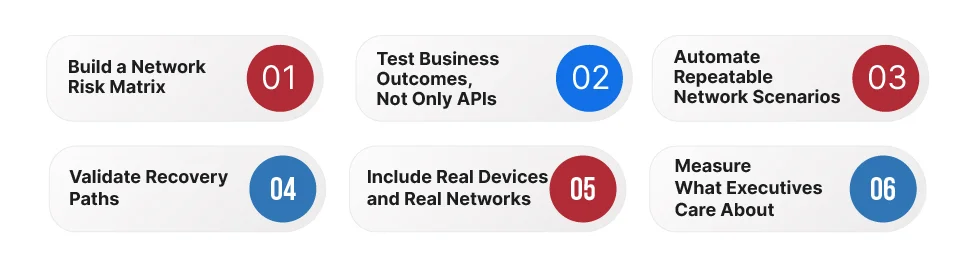
Build a Network Risk Matrix
Start by mapping user journeys against network conditions. Critical journeys should receive deeper coverage.
A practical matrix includes login, search, checkout, payment, upload, download, notification, offline capture, and data sync. Each journey should be tested under latency, low bandwidth, packet loss, network switch, and offline mode conditions.
Test Business Outcomes, Not Only APIs
A successful API response does not always mean the user journey succeeded. The user may still see stale data, duplicate records, or unclear status.
QA teams should validate what the user sees, what the backend records, and what happens after reconnection.
Automate Repeatable Network Scenarios
Manual testing is useful for exploration, but regression coverage needs automation. Network throttling should be used for mobile app performance testing during release cycles.
Automated suites should cover stable flows such as login, cart update, payment confirmation, form save, and offline sync.
Validate Recovery Paths
Many apps handle failure better than recovery. The most serious defects appear when the network returns after a partial action.
Recovery testing should verify retry queues, local persistence, transaction reconciliation, and user guidance.
Include Real Devices and Real Networks
Simulators are efficient, but they cannot replace real-device testing. Device hardware, OS versions, radios, battery state, and background restrictions can affect behavior.
A balanced approach combines lab simulation with field validation across priority devices and user regions.
Measure What Executives Care About
Mobile QA reporting should connect technical results to release risk. Useful metrics include transaction completion rate, retry success rate, error recovery time, failed sync count, API timeout rate, and poor-network crash rate.
These metrics help leaders decide whether a release is ready for production.
How Does TestingXperts Assist with Network Condition Simulation in Mobile App Testing?
TestingXperts helps enterprises design mobile QA strategies that reflect real user conditions, business risk, and release expectations.
Our approach to network condition simulation in mobile app testing focuses on controlled scenario design, device coverage, automation, and business-process validation. We test how mobile apps perform under unstable, slow, interrupted, or unavailable network connectivity.
TestingXperts can support enterprises through:
- Network condition test strategy for mobile applications
- Latency, bandwidth, packet loss, and offline mode test coverage
- Real-device testing across priority platforms and operating systems
- Mobile performance testing under poor network conditions
- Automation of repeatable connectivity failure scenarios
- Backend and API validation during retries and reconnection
- Reporting aligned to release readiness and user experience risk
For BFSI, healthcare, retail, QSR, logistics, and insurance apps, this testing becomes even more important. These industries depend on accurate transactions, timely updates, and reliable customer journeys.
TestingXperts brings AI-led Quality Engineering practices to mobile assurance, enabling teams to detect risks earlier, reduce production failures, and improve release confidence.
Conclusion
Network condition simulation in mobile app testing helps enterprises validate how apps behave when real-world connectivity fails. It covers latency, bandwidth throttling, packet loss, offline mode, handoffs, retries, and recovery.
The strongest mobile QA programs do not test only ideal conditions. They test the conditions that users face every day.
Enterprises that invest in real-world network simulation mobile testing can improve customer experience, reduce transaction risk, and release mobile apps with greater confidence. To strengthen your mobile app connectivity failure testing strategy, connect with TestingXperts’ mobile QA specialists.


Manikya Girish
Director - Delivery
Dynamically dedicated and strategic leader with over 21 years of multicultural and diversified experience in leading Delivery Management, Program Management, and Project Management in Software Testing and Quality Control. Proven expertise in engaging with executive management and diverse teams at all levels, adept at developing IT roadmaps encompassing vision, strategy, and plans.
FAQs
What is network condition simulation in mobile app testing?
Network condition simulation is the practice of testing mobile apps under controlled network scenarios such as low bandwidth, high latency, packet loss, offline mode, and network switching.
Why is mobile app connectivity failure testing important?
It helps QA teams find issues that appear when users face weak signals, interrupted connections, slow APIs, or unstable networks. These issues often affect payments, login, sync, and user trust.
How do QA teams simulate network conditions for mobile app testing?
Teams use Android Emulator settings, Apple Network Link Conditioner, proxy tools, device farms, service virtualization, and automated test environments to recreate poor or unstable network behavior.
What should be included in offline mode testing for mobile applications?
Offline testing should include local data storage, queued actions, sync recovery, conflict handling, user messaging, and data security.
Which metrics matter in network throttling mobile app performance testing?
Useful metrics include response time, timeout rate, retry success rate, transaction completion rate, crash rate, failed sync count, and recovery time after reconnection.
Discover more