We are in the digital age where data is the primary fuel for business success. Yet many enterprises still struggle to utilize it to its full potential. You may have tons of terabytes of datasets, but without the proper methodology, strategy, and tools to interpret them, they will remain useless instead of being a powerhouse. That’s why, for faster and predictive decision-making, you need cloud analytics for business instead of simple reporting dashboards.
However, the financial drain is not only caused by unstructured data. The inability to visualize and act on it also causes this leakage. To stop this, you need a unified solution like SAP Analytics Cloud and lead in your industry.
What is The Cost of Lagging Behind in Analytics Adoption?
More than just internet access, businesses must know how to effectively utilize SAP Analytics Cloud. Heavily relying on siloed data or legacy systems can cause analytics paralysis, which happens when data is distributed across multiple departments such as HR, Finance, IT, and Sales. So, when enterprises stall their analytics adoption plan, it will result in:
Slower Decision-Making
Hidden Risk Exposure
Low Performance
Forecasting Error
Also, when you fail to access real-time data in SAP analytics, you miss market opportunities, resulting in lost revenue and a diminished market share. At the C-Level, you cannot afford to depend upon manual consolidation and fragmented data analytics practices in SAP. It’s a risk that no enterprise can afford to take.
Understanding SAP Analytics Cloud: Planning, BI, and Predictive Capabilities
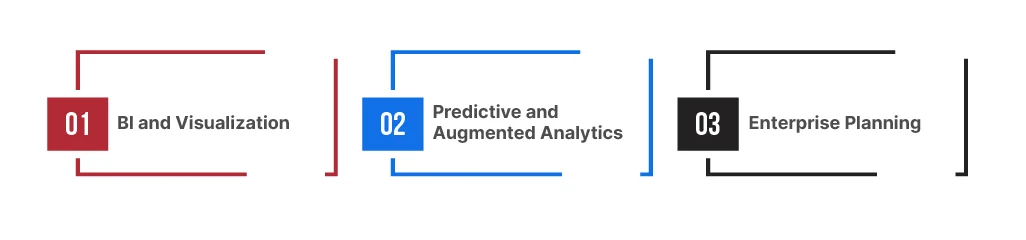
If you want to utilize data to its full potential and lead in your industry, you need to understand the theory behind it. First off, SAP Analytics Cloud is not a traditional visualization tool. It’s a comprehensive platform that handles the analytics lifecycle. Its core pillars are:
BI and Visualization:
These tools allow you to create an impactful visual representation of your data, supporting in-depth analysis and informed decision-making. The engaging dashboards and dynamic charts display data in detail, enabling users to easily interpret and present it to a diverse audience.
Predictive and Augmented Analytics:
SAP Analytics Cloud powered by AI automatically creates insights from data. Its augmented analytics capabilities provide you with actionable insights in real-time. The analytics tool uses ML algorithms and dashboards to identify relationships within data, discover patterns, and detect anomalies.
Enterprise Planning:
SAP Analytics Cloud BI and planning unify financial, supply chain, and operational planning. It helps standardize drivers and assumptions across functions, run scenarios without rebuilding spreadsheets, and integrate plans with the same governed data that’s used for reporting.
How SAP Analytics Cloud Drives Business Success?
Upgrading to SAP Analytics Cloud is a strategic business move that directly impacts your operational success. By syncing on-premises and cloud data sources, it ensures every department speaks the same data language. With SAP Analytics Cloud integration, decision-making will be more precise, and the time from insight to action will be reduced. It uses natural language to query data and deliver instant output.
With the AI-powered analytics capability of SAP, you can anticipate market changes to strategize your next-quarter plan. Real-time reporting with SAP Analytics Cloud helps you monitor KPIs on the go. For example, if an issue arises in the supply chain, it will be immediately visible on the dashboards, allowing you to adjust your strategy accordingly.
Overcoming Barriers to Analytics Adoption at the Enterprise Level
Despite the clear benefits of SAP Analytics Cloud for decision-making, implementation often faces hurdles. Understanding these barriers is the first step to overcoming them.
Data Quality Issues:
As mentioned in the introduction, bad data leads to bad decisions. If your underlying data sources (like SAP S/4HANA or non-SAP systems) contain errors, your analytics will be flawed.
Integration Complexity:
Connecting a new cloud layer to legacy on-premises systems can be technically daunting. SAP data connectivity solutions are robust, but they require precise configuration to ensure seamless data flow.
User Adoption and Skills Gap:
A tool is only helpful if people use it. Employees may be resistant to moving away from Excel. You need to demonstrate how to use SAP Analytics Cloud for business insights in a way that makes their jobs easier, not harder.
Lack of Governance:
Without proper governance, self-service analytics can lead to chaos and inefficiency. You need to balance the freedom of collaborative analytics SAP Cloud with security and data integrity.
How Can TestingXperts Assist with SAP Analytics Testing & Implementation?
When you rely on SAP data for executive decisions, testing is a control point. It protects accuracy, access, and continuity during change. TestingXperts offers SAP Testing Services to minimize migration risk and ensure stable releases across ECC and S/4HANA landscapes, utilizing an automation-first approach and established test frameworks.
As a leading SAP Testing Company, TestingXperts focuses on outcomes that matter at the enterprise level: fewer production issues, faster releases, and higher confidence in core processes. Our 15+ years of ERP and SAP testing experience, as well as a global delivery footprint, allow us to support:
S/4HANA migrations and upgrades
Major releases that change finance, supply chain, or HR processes
Rollouts that introduce new user roles, authorizations, and integrations
What you gain from SAP testing that is built for business continuity
Selecting TestingXperts as your SAP testing partner will give your business benefits that align well with executive KPIs, including:
Faster rollouts through shorter implementation cycles
Earlier defect discovery through comprehensive coverage
Higher reliability through targeted performance testing
Consistent user experiences across SAP modules
Lower testing costs through AI-driven automation and reusable assets
Conclusion
Are you building analytics that transform decisions, or analytics that produce charts? SAP Analytics Cloud unified BI augmented and predictive analytics and planning to help you lead with data. If you want assurance that your dashboards, models, and planning workflows are accurate, secure, and adoption-ready, TestingXperts can support you with customized SAP Testing Services across implementation and analytics validation.
Experienced Director- Quality Assurance with a demonstrated history of working in the information technology and services industry. Skilled in Requirements Analysis, Agile Methodologies, Test Automation, Mobile Applications, and Test Management. Strong quality assurance professional with a Bachelor of Engineering - BE focused in Electrical, Electronics and Communications Engineering from Model Institute of Engineering and Technology.
FAQs
What are the most common use cases for SAP Analytics Cloud in enterprises?
The common use cases for SAP Analytics Cloud in enterprises include:
Self-service BI with interactive dashboards and stories
Enterprise planning for budgeting, forecasting, and analysis
Predictive analytics to spot patterns and generate forecasts from business data
How does SAP Analytics Cloud integrate with SAP S/4HANA for real-time analytics?
SAP Analytics Cloud connects to SAP S/4HANA using live data connections, enabling analytics queries to access S/4HANA data in place for near real-time results. For planning, S/4HANA content packages support live connectivity between plans and actuals.
What are the key features of SAP Analytics Cloud for dashboards, planning, and predictive analytics?
Key features of SAP Analytics Cloud for dashboards, planning, and predictive analytics include:
Governed self-service BI for dashboards
Enterprise planning for budgeting and forecasting
Predictive and augmented analytics
What is the difference between SAP Analytics Cloud BI and SAP Analytics Cloud Planning?
SAC BI focuses on reporting and exploration, such as stories, dashboards, and visual analysis. SAC Planning adds planning models and write-back capabilities, enabling teams to budget, forecast, run allocations, and manage versions and workflows.
How do you manage master data and attribute maintenance in SAP Analytics Cloud models?
Managing master data and attribute maintenance in SAP Analytics Cloud (SAC) models can be achieved through several methods. Common approaches include:
Importing data directly and utilizing data management features within SAC