

Recommended Blogs

Post
Lead with Inclusion: The Unavoidable Business Case for Digital Accessibility
Table of Content
- The Rising Stakes of Digital Accessibility
- Why Consider Digital Accessibility as a Growth Strategy Beyond Compliance?
- What are the Business Cases for Digital Accessibility?
- How to Build an Executive‑Ready Accessibility Strategy?
- Why Select TestingXperts for Digital Accessibility Testing?
Share On


In today’s AI-driven world, digital accessibility has become a legal requirement. It’s not only about avoiding lawsuits or meeting compliance and government standards. Accessibility helps improve digital trust, promote inclusive innovation, and strengthen brand loyalty. According to the World Health Organization, around 1.3 billion people have some type of disability, representing 16% of the world population. It’s a major customer segment that affects growth, resilience, and brand trust.
In sectors such as healthcare, banking & finance, government, and education, a digital inclusion strategy is essential for improving customer experience through accessible design.
The Rising Stakes of Digital Accessibility
In the WebAIM Million 2025 study, around 50,960,288 accessibility errors were detected across one million home pages (on average, 51 errors per page). There were even WCAG failures, showing that the majority of companies are exposed to non-accessible practices. But since the European Accessibility Act came into effect on June 28, 2025, the compliance baseline for many services and products has become stricter in the EU region.
At the global scale, WCAG 2.2 introduced new success criteria to enable businesses to provide better support for users with cognitive disabilities and those dependent on assistive technologies. Numerous updates are already influencing global accessibility requirements. For example:
- The Americans with Disabilities Act (ADA) has increased the frequency of digital accessibility lawsuits in the US.
- All private-sector websites, self-service terminals, and mobile applications must comply with the European Accessibility Act (EAA).
- Canada’s AODA and Section 508 in the USA are influencing large-scale organizations and federal bodies to ensure accessibility for all.
Why Consider Digital Accessibility as a Growth Strategy Beyond Compliance?
Meeting compliance is a standard in the business world. But considering it, your only narrative would not be ethical. As per a study, 71% of web users with disability exit the website having accessibility issues. The business case for digital accessibility suggests that it can drive innovation, expand market reach, enhance brand trust, and mitigate legal risk. Now the question is, “How does accessibility drive business growth?”
Let’s understand it in this way: When you treat accessibility as a remediation and reactive practice, you fix issues late, spend more, and repeat defects every release. But if you consider accessibility as a business strategy, you focus on:
- Accessible design patterns
- Continuous testing and monitoring practices
- Consistent development procedures
- Easy-to-read content
This helps reduce digital friction, improve clarity and navigation, and enhances usability for users with keyboards, captions, high contrast ratios, or screen readers.
What are the Business Cases for Digital Accessibility?
Currently, AI is transforming how hard-of-hearing and deaf people can access information in real-time. For example, Windows 11 has AI-enabled live captioning that generates real-time subtitles for any audio (a MS Teams call, video, or in-person speech). Such a type of innovation delivers tangible business results, such as:
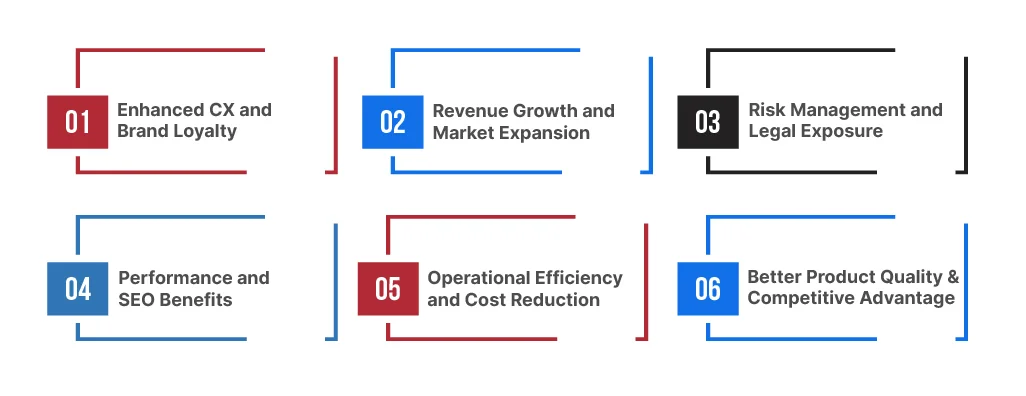
Enhanced CX and Brand Loyalty:
Accessible designs facilitate easy navigation, improve readability, and ensure predictable interactions, ultimately enhancing the customer experience. Your inclusion efforts are accelerated with a well-integrated accessibility commitment.
Revenue Growth and Market Expansion:
The WHO estimate underscores the importance of digital inclusion in business. In today’s digital environment, if you are still relying on exclusive practices, you are neglecting a massive pool of potential customers. Additionally, WebAIM demonstrates how low contrast and missing labels directly impact task completion on popular websites.
Risk Management and Legal Exposure:
The legal implications of ignoring digital accessibility vary across regions, but the pattern is similar. Enterprises should be aware that neglecting web accessibility can have a significant impact on their business. Your product must be compliant and inclusive for all users, ensuring it does not pose a reputational risk in digital services.
Performance and SEO Benefits:
Accessible websites have a clear heading structure, well-labeled images and controls, easy-to-navigate pages, and descriptive links. These quality gates will help search engines and AI systems seamlessly interpret and rank your content.
Operational Efficiency and Cost Reduction:
You spend less time fixing issues and more time building new features. Making your site or app accessible means fewer users get stuck, and fewer urgent “hotfix” releases are required. Web accessibility testing services enable you to identify issues early, which can be resolved more cost-effectively than fixing them after launch.
Better Product Quality & Competitive Advantage:
Accessibility enhances core UX by providing a clearer structure, consistent UI patterns, fewer errors, and smoother navigation across devices and contexts. These improvements increase task completion and satisfaction for all users. Accessible products win more deals, reduce churn, and outpace less inclusive competitors.
How to Build an Executive‑Ready Accessibility Strategy?
Digital accessibility is no longer optional. It serves as a catalyst for building inclusive and resilient digital ecosystems. To build an executive-ready strategy, you must treat accessibility as a continuous and strategic task throughout the development lifecycle. Let’s take a quick look at the steps involved:
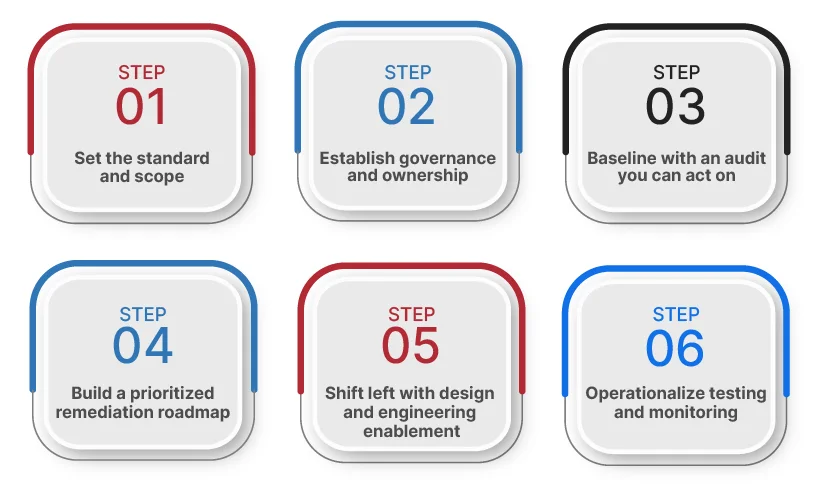
Step 1: Set the standard and scope
- Define your target accessibility level (commonly WCAG 2.2 A/AA).
- Identify in-scope assets, including marketing sites, authenticated apps, mobile apps, PDFs, and kiosks.
- Clarify risk by region, customer segment, and business criticality.
Step 2: Establish governance and ownership
Assign accountable ownership across:
- Product (prioritization and roadmap).
- Design (patterns and design systems).
- Engineering (implementation standards).
- QA (test strategy and regression).
- Legal and compliance (policy alignment).
Step 3: Baseline with an audit you can act on
A strong baseline includes:
- Automated scans for breadth.
- Manual testing for real user barriers.
- Assistive technology checks (screen readers, keyboard-only navigation).
- Evidence and reproduction steps, not just defect counts.
Step 4: Build a prioritized remediation roadmap
Prioritize by:
- High-traffic, revenue-critical flows.
- Severe barriers (cannot complete purchase, cannot authenticate, cannot submit forms).
- Repeated patterns (fix once in a component library, not 50 times across pages).
Step 5: Shift left with design and engineering enablement
- Publish accessible component standards.
- Train teams on a short list of recurring failures (contrast, labels, alt text, headings).
- Add accessibility checks to the definition of done.
Step 6:
You should treat accessibility like security and performance:
- Integrate checks into CI/CD.
- Run scheduled scans.
- Require regression testing for core flows.
- Report progress in leadership dashboards.
- Align strategy with Legal and Regional Regulations
Why Select TestingXperts for Digital Accessibility Testing?
An outcomes-focused business continuity requires more than a one-time audit. You must embed testing at the core of the development process, create transparent reporting, and have remediation guidelines for your team to use. TestingXperts, a leading web accessibility testing company, aligns its deep domain expertise and AI-enabled testing with your requirements to ensure your digital platforms are inclusive, compliant, and accessible. Our solutions deliver impact in terms of:
- 80-90% compliance with WCAG guidelines
- 75-90% improvement in compatibility with assistive tech
- 30-40% development costs savings
- 40-50% enhanced accessibility market reach
To know more about how TestingXperts can help you make your digital products accessible to all, contact our Accessibility testing experts now.


Ashwani Narula
Associate Vice President Delivery
Experienced Director- Quality Assurance with a demonstrated history of working in the information technology and services industry. Skilled in Requirements Analysis, Agile Methodologies, Test Automation, Mobile Applications, and Test Management. Strong quality assurance professional with a Bachelor of Engineering - BE focused in Electrical, Electronics and Communications Engineering from Model Institute of Engineering and Technology.
FAQs
How does digital accessibility impact brand trust, customer experience, and NPS for enterprise products?
Accessible products reduce friction for all users, including those who use assistive tools or have low-bandwidth devices. Fewer blockers and support issues improve satisfaction, strengthen trust, and can lift NPS through smoother onboarding, task completion, and renewal experiences.
What is your model for continuous testing and regression prevention in CI/CD?
We run automated checks at each stage:
- PR validation
- Build verification
- Pre-release regression on critical journeys
Our approach prevents regressions using stable API tests, targeted UI tests, change-based test selection where feasible, and release readiness dashboards tied to pass rates and defect trends.
What is the recommended operating model for digital accessibility across multiple products and regions?
Use a central accessibility CoE to set standards, reusable design patterns, and tooling. Each product team is responsible for fixes and release checks. Regional requirements get handled through shared guidelines, localization-aware reviews, and periodic audits across products.
Why do digital accessibility programs fail in enterprises, and how do you prevent those failure modes?
They fail due to unclear ownership, late-stage audits, inconsistent standards, and a lack of developer-ready guidance. TestingXperts prevents this by:
- Defining roles
- Implementing component-level standards
- Conducting early checks in CI/CD
- Prioritizing backlogs
- Performing recurring audits
Discover more